ItemStage logoItemStage
Log inContactBook Demo
Book Demo
Contents Inventory Software

Contents inventory software that catalogs every item — and proves its condition.

Contents inventory software builds the itemized catalog of everything a restoration team takes custody of — identity, condition photos, disposition, and origin room or box — and turns it into adjuster-ready reports. ItemStage captures the whole catalog entry at intake, from $299/mo per facility with unlimited users.

ItemStage is mobile-first contents inventory software for restoration, refurbishment, and high-volume item processing operations: serialized intake, condition photos at capture, disposition tagging, and itemized exports — built so the catalog is complete the moment the item hits the shelf, not re-keyed from paper later.

Looking for where items are right now — location, stage, and custody trail — rather than what you have and what condition it's in? That's contents tracking software; this page covers the cataloging and reporting side.

See inventory intake liveSee Features

Built by TetraCore inside Millers Restoration's contents operation · per-facility pricing, unlimited users

What is contents inventory software?

Contents inventory software is the system a restoration team uses to build a complete, defensible catalog of everything taken from a loss: each item's identity, condition on arrival, photographs, disposition (restorable, non-restorable, or questionable), and the room or box it came from. Its output is the itemized record the insurance claim depends on — inventory lists, condition documentation, and disposition reports an adjuster can review without a site visit. ItemStage approaches inventory as something captured once, at intake, on a technician's phone: scan a barcode or serial, photograph condition, answer the required questions, and the catalog entry is complete — no re-keying into a spreadsheet later. At Millers Restoration, the facility ItemStage was built inside, that intake discipline cataloged 10,059 items between February 1 and July 9, 2026, with over 118,000 photos and a 99.7% green-tag rate, every item traceable to an itemized report.

The best contents inventory systems go beyond a list: they enforce photo evidence at intake, link every item to a serial number or barcode, and produce an audit-ready record an adjuster or auditor can defend. ItemStage adds the layer most legacy contents tools skip — a configurable multi-stage workflow with required photos and checklist answers at each stage, so an item can't move through your floor without the evidence the catalog needs.

Disposition is the catalog's most consequential field: green-tagged items get cleaned and billed, red-flagged items become a negotiated loss, and a questioned item without photos becomes an argument. Our guide to green-tag / red-tag disposition covers how high-volume floors make that call consistently — and why the photo attached to the disposition matters more than the tag itself.

The inventory starts at the pack-out: our plain-English guide to what a pack-out is covers how the catalog begins at the loss site, and the photo documentation guide sets out the condition-evidence standard adjusters expect on every entry. To be clear about scope: ItemStage doesn't price the claim — valuation stays in tools like XactContents (see the ItemStage vs. XactContents comparison) — but the itemized, photo-backed catalog it produces is what that valuation is built on. The Millers Restoration case study shows a full production run of that catalog: 10,059 items and 118,000+ photos, February through July 2026.
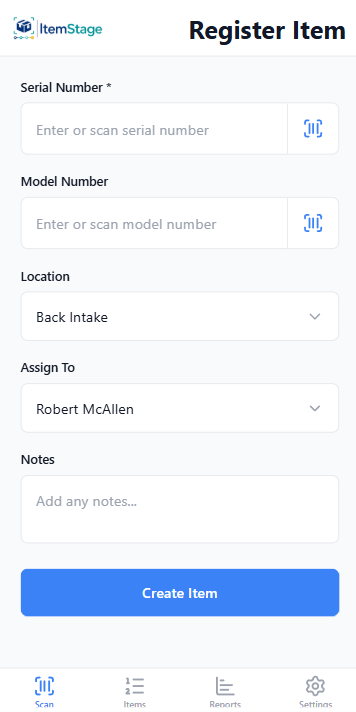
ItemStage Register Item screen capturing serial, model, condition photos, and origin for a catalog entry

Catalog at intake

Serial, model, condition photos, origin — the full catalog entry in one capture.
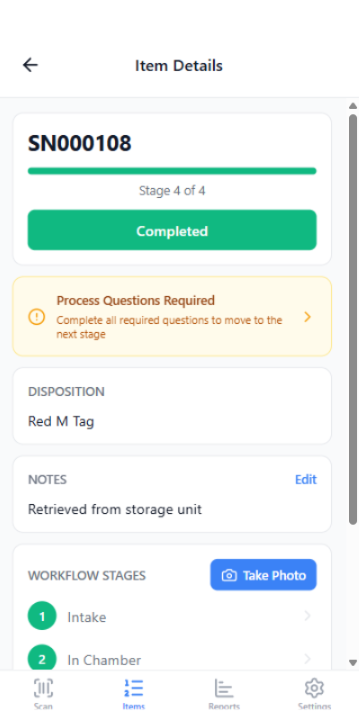
ItemStage item detail screen showing the cataloged record with photos, stage history, and disposition

The item record

Every photo, disposition, and edit on one defensible record.
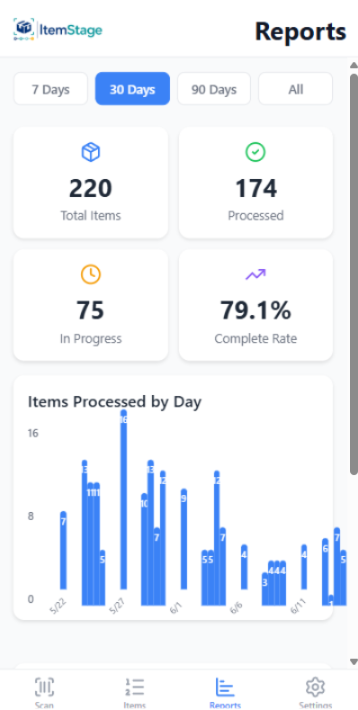
ItemStage reporting screen summarizing cataloged items and dispositions

Inventory reporting

What's cataloged, what's dispositioned, what's ready to report — live.

Screens captured from the shipping product in use at Millers Restoration — not mockups.

What ItemStage gives you

The capabilities that matter.

Serialized intake

Scan or enter serials and barcodes. Capture model, condition, source, and arrival photos in seconds.

Room & container organization

Catalog by room, box, or pallet — the origin record every pack-back and claim needs.

Stage-gated photo evidence

Required photos per stage. Items can't advance until the evidence is captured.

Disposition tagging

Green-tag, red-flag, or question every item — with the photos that justify the call.

Itemized reports & exports

Adjuster-ready PDF export for insurance or audit review plus a complete time-stamped image archive, plus CSV for your own systems.

Mobile-first + offline

Designed for the floor on iOS and Android. Keeps working when the WiFi drops.

Who uses it

  • Restoration contents processing facilities handling high item volume
  • Appliance, electronics, and equipment refurbishment & certification
  • Industrial reconditioning lots from manufacturers or insurers
  • Multi-facility operations needing standardized intake across sites
  • Operations replacing spreadsheets, phone galleries, or legacy contents tools
FAQ

Common questions.

What's the difference between contents inventory and contents tracking software?

Inventory answers "what do we have, in what condition, and what does the claim need" — cataloging, condition photos, dispositions, itemized reports. Tracking answers "where is it and who's handled it" — location, stage, and chain of custody. ItemStage does both; this page covers the inventory side, and the contents tracking software page covers the other.

How is this different from a spreadsheet or shared folder?

A spreadsheet records that an item exists. ItemStage records the entire chain of custody — who handled it, at what stage, with what photos and checks. The export is audit-ready; a spreadsheet isn't.

Does it work offline?

Yes. Intake and stage transitions queue locally and sync when connectivity returns.

Is it just for insurance restoration?

No. The workflow is fully configurable, so the same engine runs restoration pack-outs, equipment certification, and industrial refurbishment.

How does pricing work?

Per facility, starting at $299/month — all users included. See pricing.

How does it support insurance claims?

Every item carries time-stamped photos, checklist answers, and handler attribution — the chain-of-custody record that defends against "mysterious disappearance" claims and speeds adjuster review. See the chain-of-custody guide.

See it on your workflow.

30-minute walkthrough with your real stages and item types.

Book a DemoSee Pricing