ItemStage logoItemStage
Log inContactBook Demo
Book Demo
Contents Restoration Software

Contents restoration software for teams that measure success in items per day.

Contents restoration software tracks every item from pack-out through cleaning, inspection, and pack-back with photo documentation for the insurance claim. ItemStage adds what claim tools miss — stage-gated checklists, dispositions, and throughput reporting for the production floor — from $299/mo per facility, unlimited users.

ItemStage is contents restoration software built for the production floor. Mobile-first intake, a configurable multi-stage workflow, gated photo evidence, required process checks, and audit-ready chain-of-custody exports — designed for operations where throughput is the bottleneck and documentation is the liability.

TetraCore built ItemStage in cooperation with Millers Restoration, on the floor of a working contents operation. The production numbers on this page come from that facility — full data in the case study.

This page covers the full contents cycle. For the two halves of the record-keeping problem, see contents inventory software (cataloging what you have) and contents tracking software (following where it is and who handled it).

See it run a contents jobSee Features

Built by TetraCore inside Millers Restoration's contents operation · per-facility pricing, unlimited users

What is contents restoration software?

Contents restoration software is the operational system a restoration company uses to manage a customer's belongings through the contents cycle: pack-out at the loss site, transport, cleaning and processing at the facility, storage, and pack-back. Unlike estimating tools, which price the claim, contents restoration software runs the physical work — it records each item's identity, condition, location, and photo history, and enforces the processing steps the facility has promised to follow. ItemStage approaches this as a throughput problem: intake is serialized and takes seconds on a phone, every stage transition is gated by required photos and checklist answers, and managers watch items-per-day in real time instead of reconstructing it from paper. In production at Millers Restoration, that workflow processed 10,059 items between February 1 and July 9, 2026 at a 12-minute median from intake to completion, with a 99.7% green-tag (restorable) rate.

Most contents restoration tools were built for the back office: claim valuation, room-by-room listing, adjuster reports. When the same tools meet a high-volume processing floor, they slow crews down — too many fields per item, no enforced stages, no real-time throughput visibility. ItemStage takes the opposite approach. Every screen is built for a technician holding a phone next to a pallet. Stages are configurable. Required photos and checks are enforced, not advised. The chain-of-custody record assembles itself as the team works.

Disposition is where contents restoration gets financially real: every item ends the workflow green-tagged (restorable), red-flagged, or questioned, and the call is documented with photos. Of 10,054 completed items at Millers Restoration, just 27 were red-flagged — a 99.7% green-tag rate, defensible item by item.

Pricing is published, not quote-gated: $299/month Operator, $699/month Facility, and custom multi-site — per facility, with unlimited users. Every engagement starts with a 30-day workflow pilot that measures throughput against your current process before you commit.

The cycle starts at the loss site: if you're mapping the process end to end, our plain-English guide to what a pack-out is walks through it, and the photo documentation guide covers the evidence standard adjusters expect at every stage. Coming from a claims-documentation tool? The ItemStage vs. Encircle breakdown is the honest comparison.
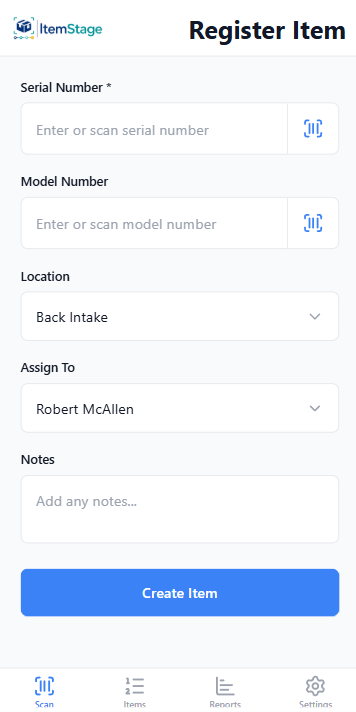
ItemStage Register Item screen: scan or enter serial and model numbers, set location and assignee

Serialized intake

Scan, photograph, assign — intake in seconds, on the technician's own phone.
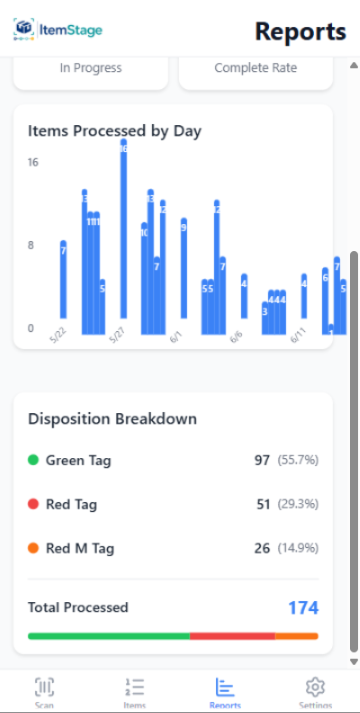
ItemStage reporting dashboard with throughput and disposition breakdowns across stages

Throughput reporting

Items per day, stage, and team — the numbers a production floor is measured on.
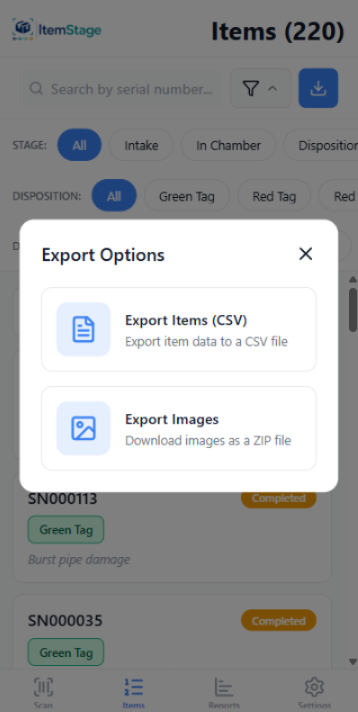
ItemStage export screen producing a PDF export for insurance and a time-stamped image archive for a contents job

Audit-ready export

PDF export for insurance + complete time-stamped image archive, one click, per item or per job.

Screens captured from the shipping product in use at Millers Restoration — not mockups.

What ItemStage gives you

The capabilities that matter.

Fast serialized intake

Scan, photo, condition — under 30 seconds per item.

Configurable stages

Pack-out, clean, inspect, certify, pack-back, or whatever your operation runs.

Gated stage transitions

Items physically cannot advance without required photos and checks.

Per-item throughput analytics

See items per stage, per bay, per shift, per facility — in real time.

Adjuster & audit exports

One-click PDF export for insurance or audit review plus a complete time-stamped image archive per item or per job.

Per-facility pricing

All users included. Scales economically as your team grows.

Claim documentation vs. floor workflow: ItemStage next to Encircle

Encircle ItemStage
Built for Documenting the loss for the claim — field documentation DNA Running the processing floor — units/day, bays, shifts
Stage-gated checklists Not the model Required photos & checks enforced per stage
Throughput reporting Claim/job reporting Items per stage, bay, shift, facility — real time
Pricing $270–650/mo flat per Capterra; not on their site $299–699/mo per facility, published here
Where it wins Full-loss documentation, floor plans, brand maturity High-volume contents processing with audit-ready custody proof

Encircle details as published July 2026 — verify with the vendor. Full breakdown: ItemStage vs. Encircle.

Who uses it

  • High-volume restoration contents processing facilities
  • Catastrophe response operations needing standardized intake across sites
  • Multi-facility restoration operators
  • Operations replacing legacy contents tools that slow the floor down
FAQ

Common questions.

Does ItemStage replace Xactimate or XactContents?

No. ItemStage is the production-floor and chain-of-custody layer. Many operations run ItemStage alongside Xactimate/XactContents for claims valuation. See our XactContents comparison.

Can we configure our own stages?

Yes. Stages, required photos, and checklist answers are configured per workflow.

Where do the production numbers on this page come from?

From Millers Restoration, the facility ItemStage was built inside: 10,059 items processed February 1 – July 9, 2026, a 12-minute median from intake to completion, 118,000+ photos, and a 99.7% green-tag rate. The full breakdown — including why we quote medians, not averages — is in the case study.

How long to get a team onto ItemStage?

Most operations are running real items through the system inside a week. Training is short because the mobile UI is built for technicians.

What does contents restoration software cost?

ItemStage publishes its prices: $299–699/month per facility, unlimited users. Encircle lists $270–650/mo flat via Capterra; Assured PackOut is $35/user/mo; iCat and Verisk are quote-only. Full math in the 2026 cost guide.

See it on your workflow.

30-minute walkthrough with your real stages and item types.

Book a DemoSee Pricing